
Written by Debbie Anderson, Founder of Beacon4ai
Here's a question worth sitting with for a moment: If you had to sell your business next month, could you hand over every login, every account, and every digital asset in one organized document?
If you hesitated even slightly, you're not alone... and those gaps are exactly where the expensive problems hide... lost domains, compromised accounts, and digital assets you paid to build but no longer control. And if you ever plan to sell your business, this matters even more. A buyer will scrutinize every digital asset you own. A seller who can hand over a clean, organized inventory of every account, every login, and every digital asset... with nothing missing and nothing in dispute... isn't just making the transfer easier. They're removing every bargaining chip a buyer might use to negotiate the price down. That kind of readiness signals a well-run business, and well-run businesses command better offers.
Digital asset management for small business isn't a software category. It's a survival skill. Your domain name, your Google Business Profile, your social media accounts, your email list, your customer data... every one of these things has real dollar value, and far too many SMB owners don't actually control all of them.
Let's talk about why this matters more in 2026 than ever before... and what you can do about it.

What We Mean by "Digital Assets" for a Small Business
The term "digital asset" tends to make people think of cryptocurrency or stock photos. But for a small business owner, your most important digital assets are much more fundamental.
Your domain name is the foundation of your entire online presence. Your website hosting holds the actual files that run your business online. Your business email is how customers reach you and... critically... how you reset passwords on every other account you own. Your Google Business Profile is often the first thing potential customers see before they ever visit your website. Your social media accounts contain years of content, audience data, and community trust you cannot rebuild overnight.
Then there's everything else: your CRM, your email marketing platform, your payment processor, your brand files, your reviews, your customer list. Each of these represents something a buyer would need, something an employee could walk away with, and something a hacker could target.
The challenge isn't that business owners don't know these things exist. It's that nobody has ever made them actually document and verify that they control all of them. That's what a proper digital asset management plan solves... and why business continuity planning has to start here.
Why This Is a Bigger Problem Than Most SMBs Realize
The Control Problem
One of the most common situations a small business owner finds themselves in goes something like this: a web developer set up the website, a marketing agency set up the Google Business Profile, a former employee created the Facebook page, and nobody remembers who registered the domain.
This isn't carelessness. It's just how businesses get built. Things get set up quickly, by whoever is available, and the person doing the setup naturally uses their own account credentials because it's easiest in the moment.
But here's the reality: whoever's name is on the account is the legal owner of that asset. If your web developer registered your domain under their account and they disappear or go out of business, they may take your domain with them. If a former employee's personal Facebook profile is the page admin, removing their access can be complicated or even impossible without their cooperation.
A missed domain renewal doesn't just take your website offline. It opens the door for competitors or cybersquatters to snatch your domain the moment it expires. Once that happens, getting it back... if you can get it back... can cost thousands of dollars. Business account recovery after a loss of access is one of the most frustrating and time-consuming problems a small business owner can face, and it's almost entirely preventable.
The Security Problem
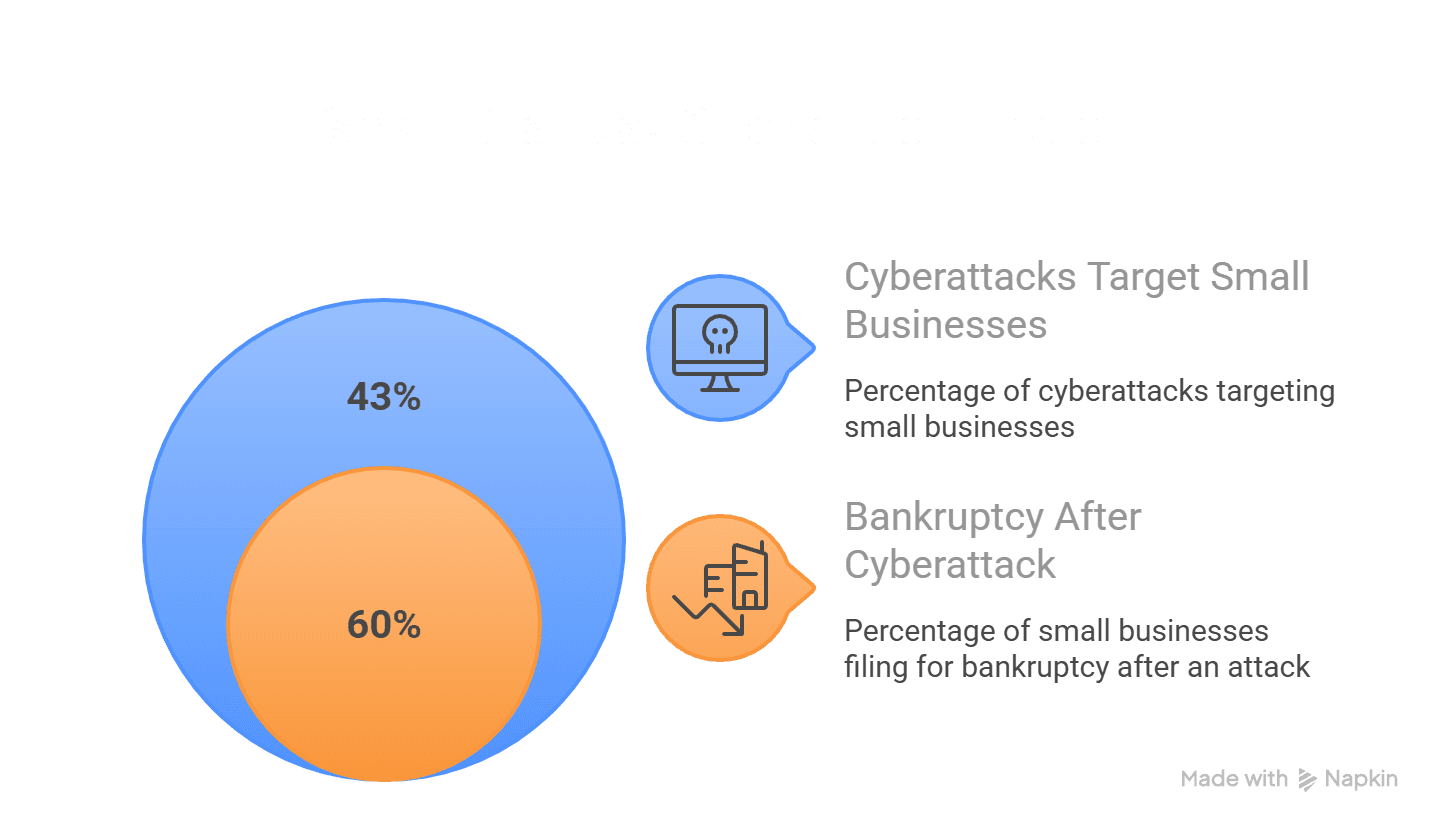
Small businesses are not too small to be targeted. Cybercriminals have figured out that it's often easier to attack twenty small businesses than one large corporation. The numbers are stark: 43% of all cyberattacks target small businesses, and 60% of small businesses that suffer a cyberattack file for bankruptcy within six months.
Credential theft... the theft of usernames and passwords... remains the single most common method attackers use to breach small businesses. According to Verizon's 2025 Data Breach Investigations Report, stolen credentials are the source of approximately 88% of basic web application attacks. If your team is reusing passwords across accounts, or logins live in a spreadsheet anyone can access, one compromised account can cascade into a business-wide crisis.
What makes this especially precarious for most SMBs: passwords on sticky notes, shared in text messages, or stored in one person's head. Web developers have some. The owner has some. The office manager has others. The marketing agency has more. Nobody has all of them. That fragmented access is exactly what attackers exploit.
Two-factor authentication (2FA) and multi-factor authentication (MFA) are your first real line of defense. CISA (the Cybersecurity and Infrastructure Security Agency) is unambiguous: "Any form of MFA is better than no MFA." Even a basic authenticator app dramatically reduces your exposure. In 2026, the best practice for SMBs goes further... passkeys are now the recommended standard. Passkeys use your device's biometric authentication (fingerprint, Face ID, or PIN) instead of a password, making credential theft virtually impossible for those accounts. As of early 2026, 26% of all sign-ins on major platforms now use passkey authentication, and every major platform... Google, Apple, Microsoft... supports them.
The Digital Toolbox Guide that accompanies this post covers all 2FA types in detail and explains which options are most appropriate for different account types. The short version: authenticator apps are more secure than SMS text codes, and passkeys are more secure than both. Use the strongest method available for your most critical accounts.
One more consideration that many SMBs overlook: cyber insurance. As attacks on small businesses increase, cyber liability coverage has become a practical necessity, not a luxury. It's also a good forcing function... most insurers require basic security practices like MFA and password management as a condition of coverage, which gives you extra motivation to get these systems in place.
The AI Visibility Problem... This One Will Surprise You
Here's where the stakes get bigger than most people expect: your digital asset health isn't just about security and business continuity planning. It directly affects whether AI search engines recommend your business to potential customers.
When someone asks ChatGPT, Perplexity, or Google AI to recommend a local service provider, these platforms don't just look at your website. They pull from your Google Business Profile, your business directory listings, your reviews, and the consistency of your information across all of them.
AI search engines are becoming the primary front door for local business discovery. Over 400 million people use ChatGPT weekly. Perplexity reaches more than 153 million visits per month. AI platforms now account for over 14% of all search volume... and that share is growing fast. When these platforms evaluate your business, they're checking whether your name, address, phone, and website are consistent everywhere they appear. That consistency is called NAP consistency (Name, Address, Phone), and it's one of the key signals AI systems use to verify that a business is legitimate and active.
Inconsistent listings... the result of old accounts nobody manages, outdated information, and directory profiles claimed by former agencies... signal neglect. Broken, uncontrolled digital assets make your business invisible in AI search. Clean, consistent, verified digital assets make your business recommendable.
This approach to optimizing your presence for AI search is called Generative Engine Optimization (GEO). Unlike traditional SEO, GEO focuses on making your business verifiable, consistent, and trustworthy across every source AI platforms draw from. And it all starts with controlling your own digital assets.
The 11 Categories Every SMB Owner Needs to Audit
The Digital Lockbox... available as a free download with our FOUND newsletter subscription... walks through all eleven categories of digital assets every small business should document and verify. Here's what each covers and why it matters.
Your domain name is your single most important digital asset. Everything else points to it. Check who is listed as the registrant right now at whois.icann.org. If your business name isn't there, that's your first fix.
Your website hosting is where your actual website files live... separate from your domain, and often controlled by whoever built the site. If you can't log in to your hosting account without calling someone, you don't control your own website.
Your business email is the reset key for every other account you own. If someone else controls your email provider's admin account, they can lock you out of everything. Knowing who has admin access here is non-negotiable.
Your Google ecosystem... Business Profile, Analytics, Search Console... is where AI search engines pull verification signals. Many SMB owners are shocked to discover that a former marketing agency still has admin control over their Business Profile or Analytics data.
Your social media accounts carry real monetary value. Years of reviews, followers, and content history are assets. Social platforms make it notoriously difficult to transfer ownership when accounts are tied to the wrong person's personal profile.
Your business directories and listings... Bing Places, Apple Business Connect, Yelp, and industry-specific directories... are the verification layer AI search engines use to confirm your business information. Poor NAP consistency across these platforms directly reduces your AI visibility and your ability to be recommended in AI search results.
Your marketing and CRM tools hold your most valuable operational data. Your email subscriber list. Your customer history. Your payment processor. If a departing agency takes the email marketing account with them, they take your entire subscriber list.
Your content and brand assets... logos, photography, website copy, video files... are things you've likely paid real money to create. If the only copy of your logo lives on a freelancer's hard drive, you have a gap that will cost you.
Your reviews and reputation are the one digital asset you truly cannot recreate. You can rebuild a website. You cannot rebuild 200 five-star Google reviews. AI search systems use review volume, recency, and quality as signals when deciding which businesses to recommend.
Your security and access management is the system... or lack of system... tying everything together. A password manager is not optional for a small business in 2026. A solopreneur typically manages 50 to 80+ logins. That is far too many to manage through memory, spreadsheets, or sticky notes. Business-grade password managers let you control who has access to what, revoke access immediately when someone leaves, and ensure your credentials survive any staff changes. Pair your password manager with two-factor authentication (2FA) on every account that supports it, and prioritize passkeys wherever they're available.
Your business foundation and legal records... your EIN, formation documents, registered agent, licenses, insurance policies, and key professional contacts... are the documents a buyer, attorney, or accountant needs before anything else can transfer.
What Makes Solopreneurs Especially Vulnerable
If you're running your business alone or with a very small team, you are the single point of failure for every system in that business. Security professionals call this the "bus factor"... how many people would need to be incapacitated before the business can no longer function? For most solopreneurs, the answer is one.
That's not meant to be scary. It's meant to be motivating. Every step you take to document and secure your digital assets raises that number, even without hiring a single employee.
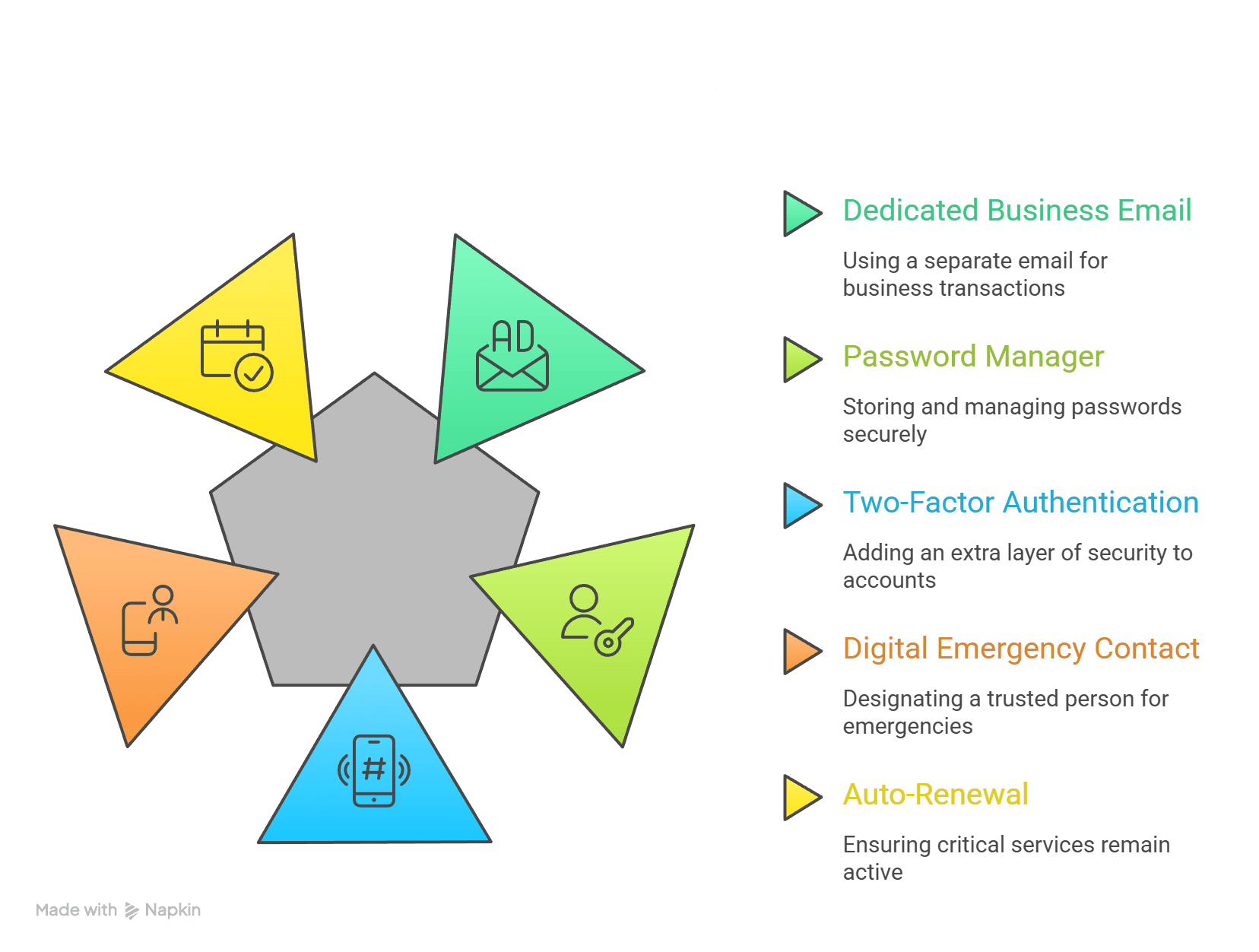
The most important actions for a solopreneur in 2026:
Use a dedicated business email for every business account... not your personal Gmail. This is the single most important thing you can do to make your business sellable, transferable, or manageable by someone else in an emergency.
Use a password manager from day one. Store the master password and recovery codes in a physical location... a fireproof safe or safety deposit box... that your emergency contact knows about.
Enable two-factor authentication (2FA) on every account that offers it. Use an authenticator app rather than SMS text codes wherever possible. Enable passkeys on accounts that support them... it's one of the simplest security upgrades available right now and takes about two minutes per account.
Designate a "digital emergency contact"... a trusted person who knows where your master credentials are stored and what to do if you're unavailable. This is the digital equivalent of a power of attorney, and most solopreneurs never set one up.
Set up auto-renewal on everything critical: your domain, hosting, SSL certificate, and email service.
The Connection to AI Visibility... Why Beacon4ai® Cares About This
You might wonder why a company focused on AI search visibility is offering a workbook about password management and domain ownership. The answer is simple: you cannot show up in AI search if your digital foundation is broken.
Generative Engine Optimization... getting your business cited by ChatGPT, Perplexity, Google AI, and other AI search platforms... depends entirely on your digital presence being clean, consistent, and under your control. When an AI platform looks your business up, it synthesizes information from multiple sources simultaneously. Your Google Business Profile needs to be verified and yours. Your business directory listings need consistent NAP data. Your website needs to be live and credibly maintained. Your reviews need to be real and recent.
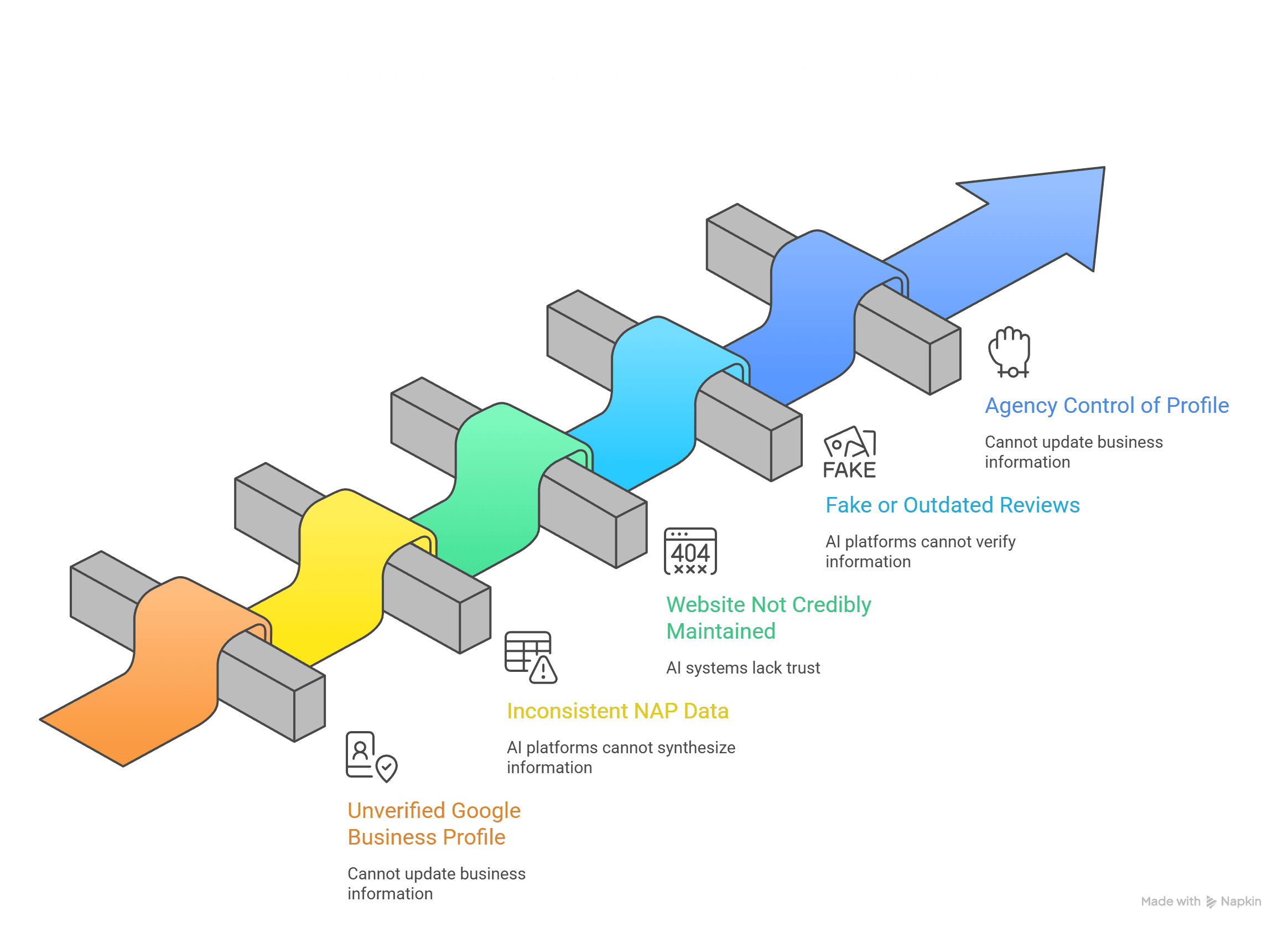
If your Google Business Profile is still controlled by a marketing agency that no longer works with you, you cannot update your hours, respond to reviews, or push accurate information to the AI systems that are increasingly becoming where customers find local businesses. Business continuity planning and AI visibility optimization are not separate disciplines. They are the same work, approached from two directions.
Businesses with clean, consistent, controlled digital presences are the ones AI systems trust enough to recommend. That trust starts with knowing who owns what.
Start With One Weekend
You don't need to fix everything at once. You need to start.
The Digital Lockbox is a free, printable workbook designed to walk you through all eleven categories, one at a time. It's built to be filled in by hand, because the act of logging in to each account and writing down the details forces you to verify that you actually have access. If you can't log in without calling someone, that's your answer... and your first item on the fix list.
Print it. Set aside a weekend. Pour a cup of coffee. Work through one category at a time.
The accounts you discover you cannot access are more valuable than the ones you can... because those gaps are exactly what you fix next.
Frequently Asked Questions
What is digital asset management for a small business?
For small business owners, digital asset management means documenting, securing, and maintaining control of every account and digital resource your business depends on... your domain name, website, business email, Google Business Profile, social media accounts, business directory listings, email subscriber list, customer data, payment processor, brand files, and online reviews. It's not software. It's a practice that protects your business continuity, your security, and your ability to be found by AI search engines.
Who actually owns my domain name?
The legal owner of your domain name is whoever is listed as the registrant in your domain registrar account... the platform where you purchased it, such as GoDaddy, Namecheap, or Google Domains. The quickest way to check public ownership is at whois.icann.org, but keep in mind that if domain privacy protection is enabled, the WHOIS record will show your registrar's proxy information instead of your name. That's completely normal and actually a recommended security practice. What matters is whether you can log in to your registrar account directly and see the domain listed there. If you can't... or if you're not sure which registrar holds it... that's your first gap to resolve. If your web developer or marketing agency purchased the domain on your behalf, they may be listed as the account holder even if you paid for it. Always confirm the domain is registered under a business email address you own and control.
What is a password manager and do I need one as a small business?
A password manager is an encrypted, centralized vault that stores all of your login credentials securely. For any SMB, it's essential... not optional. Business-grade password managers let you control which team members have access to which accounts, revoke access immediately when someone leaves, and ensure credentials don't disappear when people do. A solopreneur typically manages 50 to 80+ logins. That's too many to handle safely any other way.
What's the difference between 2FA, MFA, and passkeys?
Two-factor authentication (2FA) and multi-factor authentication (MFA) both require a second form of verification beyond your password... typically a code from an authenticator app or a text message. Passkeys go a step further by eliminating the password entirely, using your device's biometrics (fingerprint or Face ID) or PIN to verify your identity. Passkeys are more secure because there's nothing to steal... no code to intercept, no password to guess. CISA recommends any MFA over no MFA, and passkeys over traditional 2FA wherever available. The bottom line: authenticator apps are more secure than SMS codes, and passkeys are more secure than both.
Why do AI search engines care about my business directory listings?
AI search engines like ChatGPT, Perplexity, and Google AI cross-reference your business information across multiple sources to verify that you are a legitimate, active business. When your name, address, phone number, and website... your NAP data... are consistent across Google, Bing, Apple Maps, Yelp, and industry directories, AI systems trust that information and are more likely to recommend your business. Inconsistent or outdated listings reduce your NAP consistency score and directly hurt your AI visibility.
What should I do if I discover I don't have access to one of my business accounts?
This is a business account recovery situation, and it's more common than most people realize. Start by contacting the platform's customer support with proof of business ownership... your EIN, formation documents, or registered business information. If an agency or contractor controls the account, contact them directly and request transfer of ownership to your business email. For accounts like Google Business Profile, the platform has a formal process for requesting access. Document everything as you go, and use it as motivation to complete your full digital asset audit.
How often should I audit my digital assets?
At minimum, once a year. Many business owners tie this to their business anniversary or the start of the new year as a standing reminder. Also conduct a review any time a contractor, employee, or agency relationship ends... that transition is when access vulnerabilities are most commonly created and most commonly overlooked.
Are there situations where it's okay for someone else to own or control my digital assets?
Yes, and it's important to know the difference between accidental third-party ownership and intentional arrangements. Franchise operators, licensed brand users, and businesses under formal managed service agreements may have assets legitimately held by another entity as part of how the business model works. The same applies if your assets are correctly owned by your LLC or corporation rather than you personally... that's actually the recommended setup. The danger isn't third-party ownership itself... it's ownership that happened by accident, without documentation, or without a clear agreement about what happens when the relationship ends. If someone else holds one of your digital assets, the question to ask is: do we have a written agreement that defines who owns what, and what happens to that asset if we part ways? If the answer is no, that's the gap to close.
_______________________________________________________
Download the Digital Lockbox for free when you subscribe to Found.... a biweekly newsletter for small business owners focused on AI visibility and digital asset management.
[Download the Digital Lockbox Free →]
About the Author:
Debbie Anderson is the Founder of Beacon4ai, a SaaS company helping small and medium-sized businesses get found by ChatGPT, Perplexity, Google AI, and other AI search engines. After 28 years as a Marketing Director, she built Beacon4ai to close the gap between traditional SEO and the new era of AI-powered discovery.