
Found.
YOUR BRAND, DISCOVERED BY AI
Issue 004 / April 2026 • SSL Security, AI Visibility for Law Firms, and New CST Features
With Easter just around the corner, the next few days are going to be all about spending time with family, and maybe finally getting outside without a winter coat. Spring is here and it feels like a fresh start.
The past few weeks, I've had the same conversations come up with business owners right here in my state of New Hampshire so I thought I would address it from a local perspective in my most recent blog posts. Getting local backlinks, Google reviews and AI visibility. I write about this all through an NH lens. And if you're not in New Hampshire... the strategies are the same.
The other thing I'm excited about this month... we just rolled out version 2.2.1 of the Content Strategy Tool, and there's a few new features to tell you about later in this issue. If you've been using the CST, you're going to want to run a fresh report to check it out.
Wishing you a wonderful weekend, 🐇
~ Debbie
________________________
IN THE SPOTLIGHT

Industry Spotlight
Professional Services • Family Law Firm
A family law practice in central New Jersey had been in business for over 15 years. Solid reputation, strong referral network, decent Google reviews. By every traditional measure, they were established.
Then a newer attorney in the same county... solo practice, less than three years in... started showing up in ChatGPT and Google's AI Overviews every time someone asked "best divorce attorney in Middlesex County" or "how is child custody determined in New Jersey."
The established firm? Nowhere in AI results.
The issue wasn't their legal skills. Their website hadn't been updated in years. Their service pages were thin... one paragraph each. No FAQ content. No blog. No schema markup. Bing Places wasn't claimed. Their Google Business Profile category was set to "Lawyer" instead of "Family Law Attorney."
The newer attorney? Two blog posts a month answering real questions in plain language. FAQ schema. Clear headings. Links back to service pages.
Here's what we changed:
Rewrote practice area pages with NJ-specific filing requirements, residency rules, and court procedures
Published one blog post per week answering common client questions
Added FAQ sections to every practice area page answering real client questions, with schema markup across the site... FAQ schema, Attorney schema, LegalService schema, and LocalBusiness schema... so both Google and AI systems can properly read, categorize, and cite the firm
Claimed their Bing Places listing
Changed their Google Business Profile (GBP) primary category from 'Lawyer' to 'Family Law Attorney' and added secondary categories like 'Divorce Lawyer' and 'Child Custody Lawyer'
Started responding to every Google review
Got listed in the NJ State Bar Association directory and their county bar association (backlinks)
Within four months, they began appearing in AI-generated recommendations. The managing partner said:
"We spent 15 years building a reputation. It took four months of consistent digital work to make sure AI knew about us too."
THE TAKEAWAY
Your reputation matters... but it needs a digital foundation. The work that gets you ranking on Google... strong content, schema, reviews, directory listings, and correct business categories... is the same work that gets you cited by AI. You're not choosing between the two. You're building one system that does both
READ: How to Get Local Backlinks for Your New Hampshire Small Business →
_______________________
TWO-MINUTE WIN
Let AI Explain the Confusing Stuff
Give this a try:
Find that invoice, renewal notice, contract, or document that's been sitting in your inbox (or on your desk) because you're not quite sure what it's actually saying. Take a screenshot or copy the text, drop it into ChatGPT, Gemini, or any AI tool and type:
"Explain this to me in plain English."
That's it.
Decoding jargon is no fun. AI cuts through it instantly. It'll break down what each line item or clause means, flag anything that looks unusual, and give you the language to ask smarter follow-up questions if something doesn't add up.
This isn't just a time-saver... it's a confidence builder. When you understand exactly what's in front of you, you make better decisions about what to keep, what to renegotiate, and what to cancel.
Try it once this week. You'll wonder why you didn't start doing this sooner.
*Personally, I use this technique when I am setting up an account and the field options are confusing. For example, when I set up my Google Workspace account, Claude (my AI of choice) assisted me thru much of it. I asked:
"Help me to set up a Google Workspace account. I will be using this for my business, Beacon4ai®. I need one email account (debbie@beacon4.ai) and several alias email accounts (info@, support@, admin@)"
This gives it a reference point. I screenshot the setup pages that I find confusing. It walks me thru what to do and why. If I need to ask questions about it, I can. It is like having an assistant.
How to screenshot: Windows, press Win + Shift + S and drag to select. On Mac, press CMD + Shift + 4 and do the same. Then just paste it right into the chat.
⚠️ Quick note:
Before you paste or screenshot anything, make sure it doesn't include sensitive information like account numbers, passwords, Social Security numbers, medical details or banking info. AI tools process everything you share with them.
___________________________
MYTH VS. REALITY
Myth:
"I already have plenty of Google reviews, so AI search engines must be recommending me."
REALITY: Having reviews is important, but it's not the whole picture. AI systems evaluate review velocity (whether new reviews are coming in consistently), review recency, the quality of your responses, and whether your review profile is supported by other trust signals like clean directory data, schema markup, and fresh website content. A business with 100 reviews from two years ago and no owner responses sends a weaker signal than a competitor with 40 recent reviews, thoughtful replies, and a well-structured website. Reviews are one piece of a larger system... and they need the rest of the system working too.
📖 READ: How to Get More Google Reviews for Your New Hampshire Small Business →
___________________________
DIGITAL LOCKBOX
Your Website SSL / HTTPS Certificate
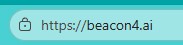
Look at your website's URL right now. Does it start with https:// and show a padlock icon in your browser like the image above? If it starts with just http:// (no "s"), your site is running without SSL... and that's a problem that's only getting bigger.
SSL (Secure Sockets Layer) is the technology that encrypts the connection between your website and anyone visiting it.
When your site has a valid SSL certificate, browsers display that padlock icon and the "https" prefix. When it doesn't, browsers like Chrome now display a prominent "Not Secure" warning that visitors can't miss. 😱
Here's why this matters for AI visibility:
Google confirmed years ago that HTTPS is a ranking signal. But what most business owners don't realize is that AI systems are applying similar trust filters when deciding which sources to cite. A site flagged as "Not Secure" sends a credibility signal... in the wrong direction.
When ChatGPT, Perplexity, or Google's AI Overviews are choosing which local businesses to reference in their answers, a site without SSL is at a disadvantage before the content is even evaluated.
Beyond AI, there's the practical reality. Visitors who see "Not Secure" in their browser leave. Forms on non-HTTPS sites transmit data in plain text... including contact information, appointment requests, and payment details. If your business collects any information through your website, SSL isn't optional. It's a basic security requirement.
Your SSL Checklist
☐ Visit your own website right now. Look for the padlock icon and "https://" in the address bar. If you see "Not Secure," your SSL certificate is either missing or expired.
☐ Check every page, not just the homepage. Some sites have mixed content issues where certain pages or images still load over http, which triggers security warnings even when SSL is installed.
☐ Contact your hosting provider. Most hosts now offer free SSL certificates through Let's Encrypt. Many include it automatically with hosting plans. If yours charges extra for SSL, it might be time to evaluate your hosting.
☐ After SSL is installed, make sure your site redirects all http:// traffic to https://. Your hosting provider or web developer can set up a 301 redirect, so no one accidentally lands on the insecure version.
☐ Update your URL everywhere... Google Business Profile, Bing Places, directories, social media profiles, email signatures. Every listing should point to your https:// address. I know this is not convenient, but it is a good business practice.
☐ Set a calendar reminder to check your SSL certificate expiration date. Most certificates renew automatically, but if yours lapses, visitors will see a full-page browser warning that can stop traffic cold.
PRO TIP 💡
Use the free tool at jitbit.com/sslcheck to scan your website for mixed content issues. Even with SSL installed, some pages may still load images or scripts over http, which triggers "Not Secure" warnings. Paste your URL, let it crawl, and fix what it finds.
SSL is the foundation underneath everything else you're building... your Google Business Profile, Bing Places listing, directory listings, and NAP consistency. Without it, every other trust signal sits on shaky ground.
New to Found.? Catch up on previous Digital Lockbox topics in our Newsletter Archive >>
The Digital Lockbox Guide below helps you track every critical account, login, and ownership detail your business depends on. We discuss a new item every issue.
🔒 Free download for Found® subscribers
The Digital Lockbox Guide... 31 pages of practical steps to make sure you always own and control your online presence. Yours as a thank you for being here.
Download Your Digital Lockbox Guide >>>
___________________________
THE WORKSHOP
🔒 Exclusive for Content Strategy Tool Subscribers
Competitive Intelligence Insights... Your New Secret Weapon in v2.2.1
If you've run a report in the Content Strategy Tool® recently, you may have noticed a new section in the Query Intelligence tab called the
Competitive Intelligence Insights.
This is brand new in version 2.2.1, and it's one of the most powerful additions we've made to the tool.
Here's what it does. When you run a report, the CST already analyzes who's ranking for your target query and which sources AI systems are citing. Competitive Intelligence Insights takes that data and translates it into specific, actionable "moves" you can make right after publishing.
Here's a real example...
A report query was done for "Who is the best divorce attorney in Middlesex County NJ?"
The Competitive Intelligence Insights revealed 4 trend-based actionable insights from the live data in the report. Here is one of them...
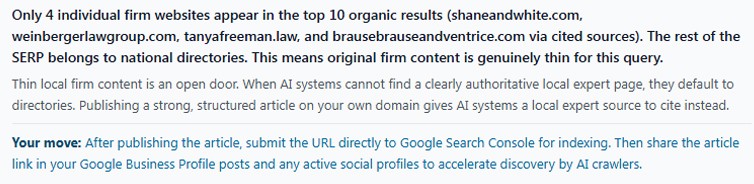
The types of actionable "moves" surfaced in a single report can include:
Directory optimization
Google Search Console submission (our example)
Google Business Profile linking (our example)
Review platform strategy
LinkedIn publishing
Social media publishing (our example)
Video content creation
Reddit engagement
Content freshness scheduling
Schema and FAQ structure
Awards and credentials visibility
Local backlink outreach
Citation loop building
Most businesses have no idea who actually owns their most important search queries — or why.
A single report shows you the competitive landscape for any query:
Top 10 of who's ranking
Top 10 of who AI is citing
where the gaps are
what moves would make the biggest difference
The report itself is valuable intelligence. When you're ready to act on it, the SEO and AEO-ready article the tool builds gives you the fresh content to compete.
_______________________________
Curious about the Content Strategy Tool?
Try it free... 3 reports, no credit card required→
_______________________________
TRENDING AI TERMS
AI Overviews
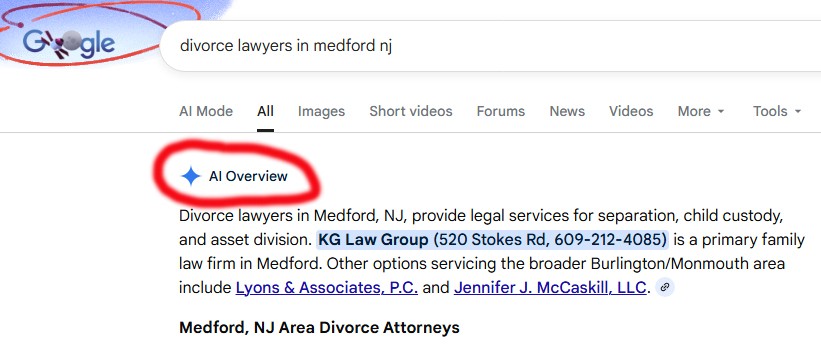
AI Overviews are the AI-generated summaries that now appear at the top of Google search results. When you Google a question and see a written answer above all the links... that's an AI Overview. Google is pulling information from multiple websites, synthesizing it into one response, and showing it before anything else on the page.
Here's what's changed:
Google is showing AI Overviews on significantly more searches than it did a year ago, and they're no longer limited to simple informational questions. They're now appearing on commercial searches, service-related queries, and even branded searches. If someone Googles "divorce lawyers in Medford NH," AI Overview is answering that question before the searcher ever scrolls to a single website (see photo above).
Why this matters for your business:
AI Overviews decide which sources to pull from. If your content is well-structured, your directory listings are consistent, and your reviews are fresh... you're a candidate to be cited. If not, you're invisible in the most prominent spot on the page.
The businesses showing up in AI Overviews are the same ones doing the proactive work we talk about in every issue of this newsletter. It's not a coincidence.
📖 READ: How Small Businesses Get Found by AI Search Engines →
Get Found. in your inbox.
Practical AI visibility tips for small businesses. Free, biweekly.