
Found.
YOUR BRAND, DISCOVERED BY AI
Issue 008 / May 2026 - Google Review Strategy + Google's AI Is About to Call Your Business

Hi ,
May always sneaks up on me. One minute I'm wishing away that last snowbank (yes, in May) and the next I'm knee deep in the garden wondering where spring went. But here in the Valley, everything moves fast once it starts... and that's kind of where we are with AI Search Visibility right now too.
I've been having a lot of conversations with business owners this spring and there's a reoccurring topic that keeps popping up. Most of them already know that AI search is changing how customers find businesses. They're just not sure what to do about it. A lot of them are convinced that ChatGPT or another AI tool can handle the content side for them... so they try that, it doesn't quite land, and then nothing gets done at all. They're stuck somewhere between knowing it matters and not knowing where to actually start.
The ones who do take action almost always hit the same wall next: "I know I need fresh content on my site but I just can't make it happen." They want it fully automated. I get it... everyone is stretched thin. But here's the thing. Google and AI systems are getting better at identifying generic AI-generated content, and generic doesn't get cited. What gets cited is content that has real expertise, real specificity, and a real human voice behind it. You can't automate that part without a lot of hard work and time developing a knowledge database and that part has to come from you.
That's exactly why I built the Content Strategy Tool® the way I did. It handles the research, the competitive analysis, the structure, the keywords, the schema, the FAQs... all of it. The only thing left for you to do is add the layer that only you can write. It's not a magic button, you still need to invest in producing something that actually works by reviewing the article and adding your brand voice.
The businesses showing up in AI answers right now aren't doing anything complicated. They're doing the fundamentals consistently... keeping their information current, earning real reviews on a regular basis, maintaining complete and accurate profiles across the web. It's maintenance, not magic. And it's exactly the kind of thing that's easy to keep putting off until the moment you realize your competitor has been doing it all along.
This issue is about that. And there's one piece of news in particular that I think is going to change the conversation for a lot of business owners... so keep reading.
Let's dig in.
~ Debbie
____________________________
NON-NEGOTIABLES

Your Google Review Strategy:
More Than Stars, More Than a One-Time Ask
Most business owners think about Google reviews the same way they think about getting a haircut. You do it when you remember, feel a little better about it, and then forget about it again for three months. I say this because I know first-hand. I would do this task a little more frequently than that but there was always something higher up on that to-do list to divert my attention.
That approach was fine in 2020. In 2026, it's costing you visibility now.
Reviews are no longer just social proof for people who are already considering your business. They are now one of the primary signals that AI systems use to decide whether to recommend your business at all. One study found that ChatGPT references reviews in 58% of its responses, and Perplexity uses them in 100% of responses. AI-recommended businesses average a 4.3-star rating across their review profiles.
In other words: if you don't have a steady, consistent stream of genuine reviews, AI search may simply skip you.
What you should know:
A Google review strategy is not complicated. It is just consistent. Here's what it looks like in practice:
☐ Make asking a habit, not an event. The best time to ask for a review is right after a positive experience... not three weeks later in a bulk email. Build a simple ask into your workflow. A text message. An email follow-up. A card with a QR code at checkout. Pick one and do it every time.
☐ Make it easy. Most customers who want to leave a review give up because the process feels confusing. Create a direct Google review link from your Google Business Profile dashboard and use that link every time. One click, right to the review box.
☐ Respond to every review. Every single one. Positive reviews deserve a genuine thank-you (not a copy-paste template). Negative reviews deserve a calm, professional response... and we'll walk through exactly how to handle those in the Two-Minute Win below.
☐ Don't batch-ask. Asking 20 people at once, or running a "leave us a review" campaign, looks unnatural to Google's systems and can actually hurt you. Steady and consistent beats occasional and urgent.
☐ Document it. Add your Google review link and current review count to your Digital Lockbox. Your review profile has real business value, especially in a sale or transition.
💡 PRO TIP: Your response to a negative review is often more visible than the review itself. A calm, professional reply signals to Google... and to every future customer reading it... that your business handles problems well. That's a trust signal. Use it.
___________________________
INDUSTRY WATCH

Google I/O • May 19, 2026
Google Is About to Start Calling Your Business for Customers
Yup, you read that right. At their annual developer conference on May 19, Google announced what it's calling the "Agentic Gemini Era." The short version: Google's AI is moving from answering questions to taking action.
Here's the piece that matters most for local service businesses.
Google is expanding what it calls agentic booking in Search.
How this will work:
A customer shares their criteria... say, finding a dog groomer available Saturday morning within ten miles. Google's AI searches, compares options within the pet care category, and this summer will be able to call businesses directly on the customer's behalf to check availability and book. Google has confirmed this will roll out across additional categories including home repair and beauty services as well.
Google says this rolls out to everyone in the US this summer.
A customer shares their criteria... say, finding a dog groomer available Saturday morning within ten miles. Google's AI searches and compares options within the pet care category, and this summer will be able to call businesses directly on the customer's behalf to check availability and book. Google has confirmed this will also roll out for home repair and beauty services, with additional categories expected to follow.
What this means for you right now… before it goes live:
The businesses Google's AI will call are the ones with complete, accurate, trusted profiles. Before this summer, make sure:
Your Google Business Profile is fully built out. Every field filled. Hours current. Services listed with real descriptions. Photos recent. This is the data Google's AI reads before it decides to call you.
Your business name matches your real-world signage exactly. Google now enforces this. Keyword descriptors or anything beyond your actual business name can get your profile suspended.
Your NAP is consistent everywhere. Your name, address, and phone number must match across your website, GBP, and every directory. Inconsistencies are a trust signal in the wrong direction.
You have active, recent reviews with responses. AI systems read reviews before recommending a business. A profile with thin or stale review activity is easy to pass over.
The businesses it won't call are the ones with thin profiles, stale information, no reviews, or unanswered complaints sitting in plain sight.
📞⚠️🤖 One more thing worth doing now: BRIEF YOUR TEAM
When Google's AI agent calls your business, it will sound automated. Train anyone who answers your phone to recognize these calls, take them seriously, and respond with the same professionalism they would give any customer. A missed or dismissed call is a missed booking. Make sure nobody on your team hangs up on a customer just because the voice on the other end isn't human.
READ: How to Optimize Your Google Business Profile →
_________________________
TWO-MINUTE WIN

Use AI to Respond to a Negative Review
Getting a negative review is one of the most emotionally charged moments in business ownership. It's personal. It's public. And it demands a response... but usually at the worst possible time, when you're frustrated or defensive.
Here's the fix. Use AI to take the emotion out of it.
Copy this prompt, paste it into your AI tool of choice, and replace the URL with your own:
A customer left the following review on my Google Business Profile:
[Paste the review here]
My business is a [type of business] located in [city]. Please write a professional, calm, and brand-appropriate response that: — Acknowledges the customer's experience without admitting fault for anything that isn't accurate — Keeps a warm, professional tone throughout — Does not get defensive or emotional — Ends with an invitation to continue the conversation offline, including my contact email: [your email] — Is no longer than 4-5 sentences
Read the response, adjust any details that feel off, and post it. Total time: two minutes.
A few things worth knowing:
Keep all negative review responses under 100 words. Do not offer refunds or compensation publicly. And never argue. The goal is to show every future customer reading that thread that you are a business that listens and handles things professionally.
____________________________
MYTH VS. REALITY

MYTH: "I asked a few happy customers for reviews when we first opened. That's enough."
REALITY: Recency is one of the most important factors in how Google and AI systems evaluate your review profile. A business with 40 reviews from two years ago often ranks lower than a competitor with 15 reviews from the past three months.
AI search tools favor businesses with a current, active presence... and reviews are one of the clearest signals of that. A handful of old reviews isn't a review strategy. A steady habit of asking, earning, and responding is.
READ: Google Reviews: Your 24/7 Sales Team >>>
_______________________________
DIGITAL LOCKBOX
Category 7: Marketing and CRM Tools (Continued)

Your Customer Contact Records
Last issue (007) we covered your email marketing platform and why owning your list matters. This issue, we're going one layer deeper: your CRM, or the place where your actual customer and contact records live.
A CRM (Customer Relationship Management tool) is simply the system where you store information about your customers and prospects. For some businesses that's a full platform like HubSpot, Active Campaign (which is what I use), Salesforce, or Zoho. For others, it's a shared spreadsheet. For many small businesses... it's in someone's head, or worse, in a former employee's inbox.
If you don't have a formal CRM, you still have contact records somewhere. And wherever they are, you need to know that you own them and can access them.
Why this matters:
Your contact records represent real business value. Past customers, warm leads, vendor relationships, referral partners. If a key team member leaves, if you change platforms, or if you ever sell your business, that data needs to move with you.
Open your Digital Lockbox to Category 7 and document the following:
☐ Where do your contact records actually live? Name the platform or file. If the honest answer is "I'm not sure," that's your starting point.
☐ Does your business own the account? Is it registered under your business name and a business email, or under a contractor, former employee, or agency?
☐ Can you log in right now? If the answer is no, that is your most urgent fix this week.
☐ Can you export your contacts? Every major CRM platform allows a full contact export as a CSV file. Log in and find that export function. Save a copy somewhere outside the platform.
☐ Do you even have a CRM? If the answer is no, you don't need an expensive one. Even a well-organized Google Sheet with customer names, emails, and last contact dates is a starting point. The goal is a system you own and can access, not a perfect one.
Your customer relationships are one of your most valuable business assets. Make sure the records that represent them are yours to keep.
The Digital Lockbox Guide
|
|
____________________________
THE WORKSHOP
🔒 Exclusive for Content Strategy Tool® Subscribers
You're Sitting on Competitive Intelligence. Are You Using It?
What the "Your Move" Callouts Are Actually Telling You
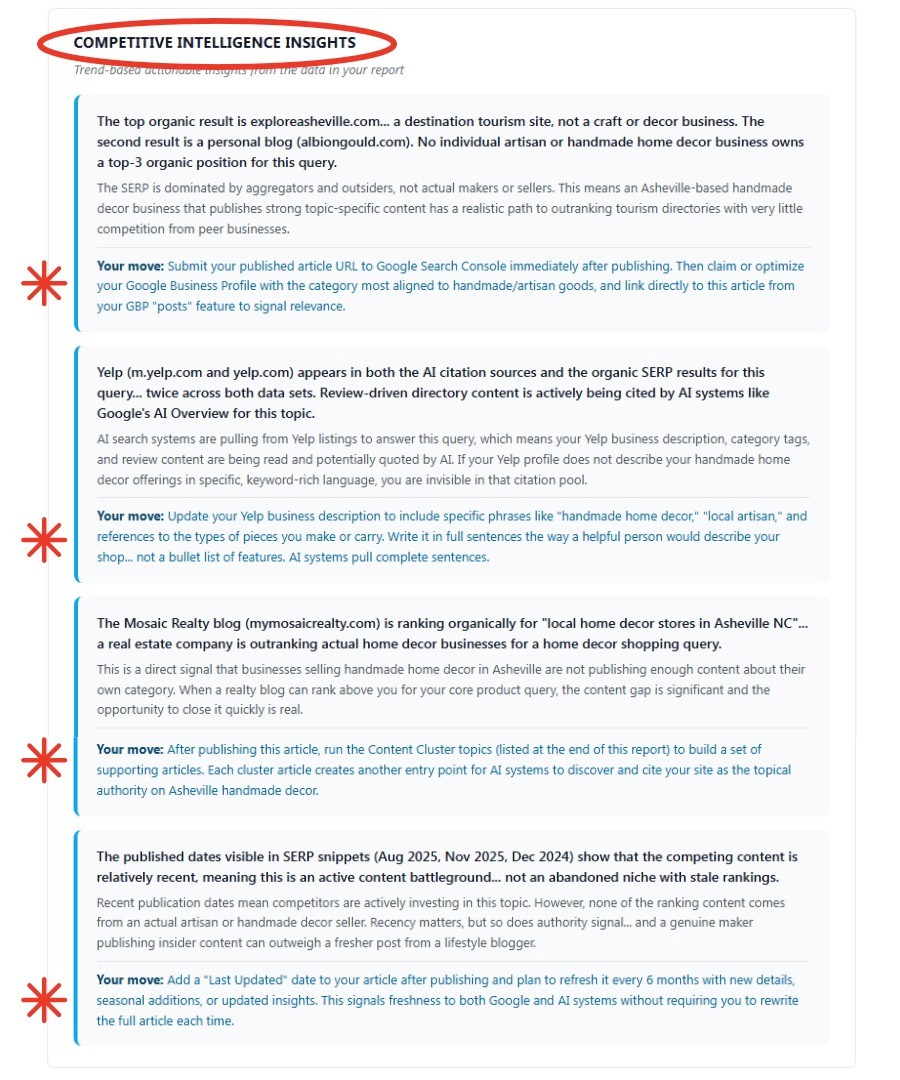
Every Content Strategy Report® includes a section in the Query Intelligence tab called Competitive Intelligence Insights. It sits below the Competitive Gap Analysis and most subscribers scroll right past it. That's a mistake, because those "Your Move" callouts are the most specific, data-backed editorial direction in the entire report.
To show you what I mean, take a look at the screenshot from an actual report above. The query was "where can I find unique handmade home decor in Asheville NC" and the Competitive Intelligence Insights surfaced four findings, each with a Your Move attached. Here's what those callouts are really saying and why they matter beyond just one query.
Your Move #1: Submit to Google Search Console immediately after publishing. This comes up regularly in reports because most business owners either don't have GSC set up, don't have access to it, or forget it exists the moment they hit publish. Submitting your URL to GSC after publishing is how you tell Google your new content exists right now, rather than waiting for it to be discovered on its own which can take weeks. If you covered GSC in Issue 007 and got yourself access... this is exactly why that matters.
Your Move #2: Update your Yelp description with specific, keyword-rich language written in full sentences. This callout appears because Yelp showed up in both the AI citation sources and the organic SERP results for the query. AI systems are actively pulling from directory listings to answer questions. If your Yelp description reads like a bullet list of features, it isn't getting cited. Full sentences, specific language, written the way a helpful person would describe your business. That's what AI pulls from.
Your Move #3: Run the Content Cluster topics to build supporting articles. Notice what was outranking actual handmade decor businesses for a handmade decor query in the Asheville report... a real estate company blog. When an unrelated business is outranking you for your own core query, it means the content gap is wide open and the bar to clear it is low. The Content Cluster tab gives you the supporting articles to build topical authority around your pillar post so that gap closes over time.
Your Move #4: Add a "Last Updated" date and refresh every six months. This one is worth paying close attention to. A publish date on a blog post signals to both Google and AI systems that the content is current and being maintained. A post with no date at all sends the opposite signal... AI systems treat undated content as potentially stale and are less likely to cite it. If you look at your own blog and see posts without dates, that is worth fixing. Add the date. And when you refresh the content, update it. A "Last Updated" label tells AI systems the page is actively maintained without requiring you to rewrite it from scratch.
The Your Move callouts in your reports aren't decorating the data. They are translating it into a post-publish action list specific to your query. Read them. Act on them. That's where the real value of the report lives.
READ more about how to read the report: You Don't Need to Know SEO. You Just Need the Right Report >>>
Curious about the Content Strategy Tool?
Try it free... 3 reports, no credit card required→
___________________________
Got a question about AI visibility?
Submit it and you might see it answered in the next issue.
Wishing you much success and if you'd like to reach out directly for a conversation about how I can help your business thrive, give me a shout at Hello@Beacon4.ai
Get Found. in your inbox.
Practical AI visibility tips for small businesses. Free, biweekly.