
Found.
YOUR BRAND, DISCOVERED BY AI
Issue 009 / June 2026 - Is your business telling the same story everywhere?
Hi ,
It's National Email Week (yup it's a thing) which feels like as good a reason as any to appreciate the small stuff that quietly runs a business. I spend my days alongside business owners who wear every hat, and email is one of those steady, unglamorous tools that just... shows up and works. Kind of like the people who run the businesses I love working with.
Okay, enough sentiment.
So the big question... Is your brand getting found in an AI search?
Let's dig in.
~ Debbie
__________________
NON-NEGOTIABLES

One Business. One Description. Everywhere.
You already nailed your name, address, and phone (NAP) back in Issue 003. This is the next layer: the words that describe your business... and whether they tell the same story wherever AI looks.
Here's the issue. Your website might say "family-owned HVAC company serving the Lakes Region." Your Google Business Profile says "heating and cooling contractor." Your Yelp bio says "AC repair and installation." Your Facebook About section says something you wrote in 2019 and forgot about.
To a human, those all clearly describe the same business. To an AI system, those are conflicting signals... and conflicting signals make it less confident about what you do and whether to recommend you.
The catch you've probably hit: every platform gives you a different amount of space for your business description. So the goal isn't identical text everywhere... it's the same core facts and story, sized to fit each space. Write the longest version first, then trim down.
Run this quick consistency check:
☐ Write your full version first... the complete description with detail and a little personality. This goes on your website About page and Yelp, where you have room. Use AI to help you by having it analyze your website. It's a good jumping off version.
☐ Trim it to a short paragraph for your Google Business Profile and Facebook. One note on GBP: you get 750 characters, but only the first 250 show before "Read more," so front-load what you do, your main service, and your city right up top.
☐ Trim once more to a one-liner for your LinkedIn tagline and directory blurbs.
☐ Now compare the description and primary category across every listing... GBP, website, Yelp, Facebook, LinkedIn, directories. Do they tell the same story?
☐ Fix the outliers. Keep it natural... no keyword stuffing, and skip "best" or "#1" (Google's guidelines frown on those anyway). Be specific instead: "handcrafted pasta made daily" beats "best Italian food in town."
☐ Save all three sizes in one place so your next new listing takes two minutes.
Bottom line: Tell the same story everywhere, just sized to fit. That way, wherever someone finds you... a person or an AI... they get the same answer.
And put a reminder on your calendar to re-check every six months... listings drift on their own, so a twice-a-year look keeps you consistent.
📖 READ: How Small Businesses Get Found by AI Search Engines and What to Do First →
_____________________________
INDUSTRY WATCH

Google • June 10, 2026
Gemini Is About to Connect Directly to Your Google Business Profile
Yesterday Google announced a new feature that lets you connect your Google Business Profile directly to the Gemini app with a single tap. Once connected, Gemini becomes an AI assistant that actually knows your business... with access to your reviews, customer questions, and performance data.
A few things it can do: ask "How did my business do this month?" and it analyzes your search impressions, direction requests, and call data. Ask for help with a review and it drafts a reply that references what the customer actually said. Or tell it to update your hours, post a seasonal update, or find the gaps in your profile. There's also a companion feature, Business notebooks, for organizing your workflows and tasks in one place.
One note on the timing: this is rolling out gradually starting this month, so it may not appear in your account yet. It's also launching globally but not in the UK or EEA for now. So check the Gemini app... just don't be surprised if the connection isn't live for you quite yet.
It's part of a bigger pattern. Google has spent this spring turning Gemini into an all-purpose assistant for business owners, not just a chatbot, and tying it tighter to the profile data you already manage.
What this means for you:
The information sitting in your Google Business Profile right now... your description, your categories, your reviews, your photos... is becoming the raw material an AI assistant uses to represent you. That's exactly why this issue's Non-Negotiable matters. A clean, accurate, consistent profile isn't just good housekeeping anymore. It's the source AI reaches for first.
_______________________________
TWO-MINUTE WIN

Read Your Facebook "About" Section
Open your business Facebook page and click into the About section. Now actually read it, top to bottom. When was the last time you looked?
For a lot of businesses, the Facebook About section is one of the easiest listings to forget. You set it up once, and then... life. The hours are from two years ago. The description still mentions a service you stopped offering. The website link points to your old site. Maybe there's a tagline you don't even remember writing.
Here's why it matters for this issue: that stale About section is one of the conflicting signals pulling against your fresh website. AI blends all your listings together, and the outdated ones still get a vote.
Fix what's wrong while you're in there... it takes two minutes... and bring the description in line with the master version from this issue's Non-Negotiable. One more listing telling the same story.
____________________________
REAL TALK

"I updated my website months ago, but when I ask AI about my business it still describes the old version of me. Why won't it catch up?"
This one comes up a lot, and it's frustrating because you did the work. Here's what's happening: your website is only one of many places AI pulls from. If your old description still lives on your Google Business Profile, a directory listing, an old press mention, or a social bio, the AI is blending all of it together... and the outdated copies are outvoting your fresh website.
The fix isn't to update your website again. It's to hunt down the stale copies everywhere else and bring them in line. AI tends to trust the consensus across the web more than any single page. Give it a consistent consensus to find.
💡 PRO TIP: How to actually find the stale copies.
You can't fix what you can't see, so do a quick hunt.
Open Google Search (google.com) and run these searches, each in quotes:
Your business name plus your city: "Joe's HVAC" Conway NH
Your phone number: "603-555-1234" ... this surfaces listings even when your name is spelled differently.
An old detail you know is outdated: a former phone number, a dropped service, or a tagline you've retired. Anything still showing it is a stale copy.
The quotation marks are the trick... they tell Google to find pages with that exact text, so whatever comes up really is a page mentioning your business that way.
Then run the same searches in Google Maps (google.com/maps) with your city set. Make a quick list of every place you find... Yelp, old directories, data-aggregator listings, that profile a previous marketer set up years ago. Most owners are surprised by how many listings turn up that they've never seen. That list is your fix-it roadmap.
____________________________
DIGITAL LOCKBOX
Category 10: Security and Access Management (Part 1 of 3)

Two-Factor Authentication:
Who Actually Holds the Keys
Two-factor authentication (2FA) adds a second step after your password... the code or prompt you enter to prove it's really you. It's one of the smartest security habits a business can have. It's also one of the easiest ways to accidentally lock yourself out of your own business. 😕
These things just happen in a business. People leave, on good terms or bad. Someone gets a new phone or changes their number. A device breaks. And if the 2FA code is going to a phone you can't reach, you're locked out of an account you legally own.
That's exactly what the FREE Digital Lockbox is for. The lesson here isn't just "turn on 2FA"... it's making sure your business, not one individual's personal phone, controls that second factor.
Use the DIgital Lockbox Workbook to record your business information:
☐ Work through your critical accounts one at a time in the Digital Lockbox workbook... domain registrar, website host, Google Business Profile, email, social platforms, payment tools. (The Digital Lockbox Guide below gives you a place to document each one.)
☐ As you go, check how 2FA is set up on each... text to a phone, an authenticator app, or email. Authenticator apps like Google Authenticator or Authy are safer than text codes.
☐ Flag any account where 2FA is tied to a personal phone or an individual employee's device. That's the business risk.
☐ Move those to an authenticator app the business controls, so the second factor isn't locked to one person.
☐ Print your backup/recovery codes and store them somewhere physically secure, like a safe. Not in a digital file, and never with your passwords.
Strong security and clear ownership aren't in conflict. You want both: locked to outsiders, accessible to you.
💡 PRO TIP
Recovery codes are the spare key under the mat... except safer, because only you know where they're stored. Save them the day you set up 2FA, not the day you're locked out.
The Digital Lockbox Guide
🔒 Free download for Found® subscribers
The Digital Lockbox Guide helps you track every critical account, login, and ownership detail your business depends on. We work on a new item every issue.
Download Your Digital Lockbox Guide >>>>
_______________________
THE WORKSHOP
🔒 Exclusive for Content Strategy Tool® Subscribers
Let the Content Cluster Tab Plan Your Month
If you're publishing about one blog post a week and running a report to do it, here's a way to make each report pull double duty. Every report includes a Content Cluster tab with 5 suggested cluster ideas... and those aren't just "more topics." They're the cluster articles that support the pillar your report is built around.
Here's how the pillar-and-cluster move works. Your main report topic is the pillar... the broad, authoritative page on a subject. The 5 cluster suggestions are the focused articles that branch off it, each answering a more specific question and linking back to the pillar. Together they signal to AI that you cover the topic with real depth, not just one shallow page.
One report gives you the pillar plus a month of direction: write the pillar, then work through those 5 cluster ideas over the following weeks, linking each one back to it. Next month, a new report... a new pillar, five new clusters.
Curious about the Content Strategy Tool?
Try it free... 3 reports, no credit card required→
___________________________
TRENDING AI TERMS
QUERY FAN-OUT
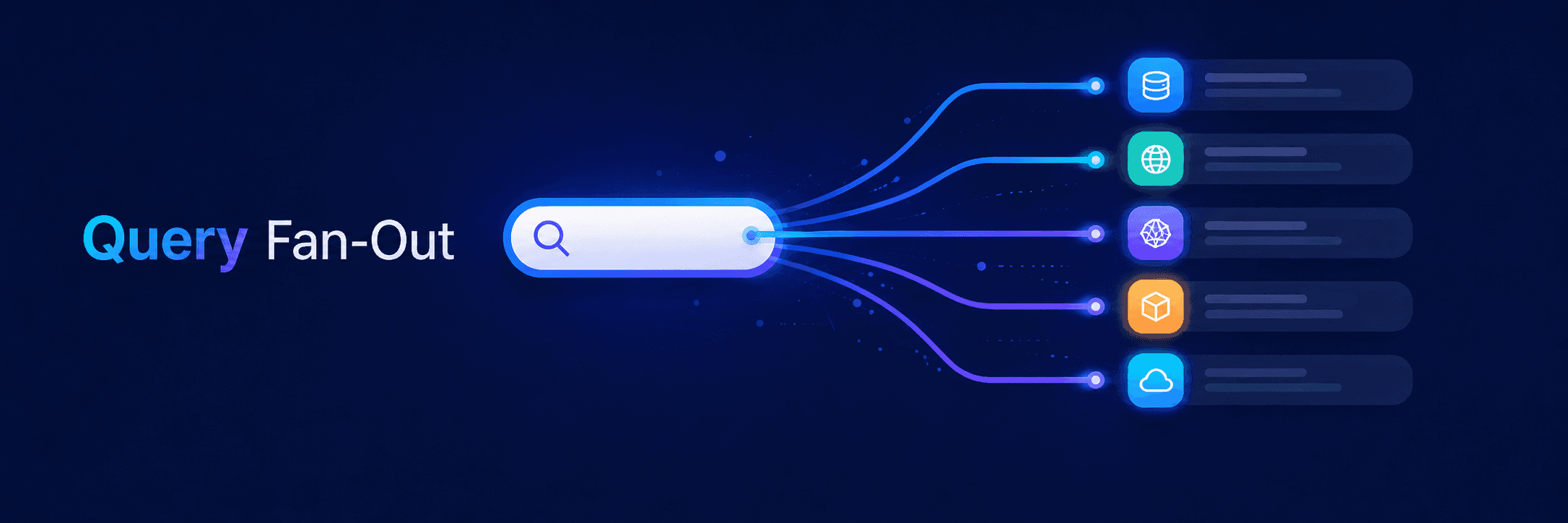
When you ask an AI assistant a question, it usually doesn't run just that one search. Behind the scenes, it "fans out" your question into a bundle of related sub-questions, searches all of them, and assembles an answer from the best pieces it finds.
Ask "who's the best bakery in town for a wedding cake," and the AI quietly checks things like bakeries near me, wedding cake specialists, custom cake reviews, pricing, lead times... then stitches the answer together.
Why this matters for your business:
You're not trying to win one keyword anymore. You're trying to be a good answer to a whole cluster of related questions. The businesses that show up are the ones whose content covers the natural follow-ups, not just the headline search.
If you read The Workshop section above, this is why the pillar-and-cluster approach works so well. A pillar with its clusters is the published version of query fan-out... you answer the main question and all its natural follow-ups, connected. You're building your content the same way AI takes a question apart. And the more completely you cover a topic, the more AI sees you as an authority on it... that topical authority is exactly what earns you the citation.
_____________________________
Got a question about AI visibility?
Submit it and you might see it answered in the next issue.
Get Found. in your inbox.
Practical AI visibility tips for small businesses. Free, biweekly.