
Written by Debbie Anderson, Founder of Beacon4ai
If you've noticed your website traffic shifting or wondered why a competitor keeps showing up in ChatGPT answers while you don't, you're asking exactly the right question. Running an AI visibility audit is a different process than a traditional SEO audit... and once you understand what AI systems are actually looking for, the fixes become a lot more obvious. Here's a straightforward, step-by-step process you can work through yourself, without needing an agency or an expensive tool subscription to get started.
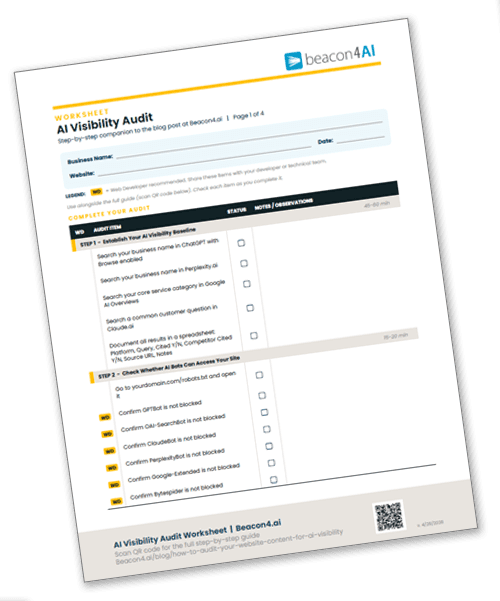
Want to work through this audit step by step? Download the free AI Visibility Audit Worksheet and use it alongside this guide.
Why AI Visibility Is Different From Traditional SEO
Traditional SEO audits chase keyword rankings and backlink counts. AI visibility is about something more fundamental: whether an AI system can find, read, understand, and trust your content enough to cite it in an answer.
Platforms like ChatGPT, Claude, Perplexity, and Google’s AI Overviews don’t just scan for keywords. They synthesize information from sources they consider authoritative, clearly structured, and directly useful to the question being asked. AI platforms can only cite what they can crawl, parse, and understand.
That means your AI visibility audit has three distinct layers:
Technical access … can AI bots actually read your site?
Content structure … is your content formatted in a way AI can parse and quote?
Authority signals … does your content demonstrate enough expertise and trust to be cited?
Miss any one of these layers and even great content becomes invisible to AI systems.
Step 1: Establish Your AI Visibility Baseline
Before you change anything, you need to know where you stand. This is your starting snapshot.
Manual Testing (Free, Start Here)
Open an incognito browser window and go to each of these platforms one at a time:
Perplexity.ai
ChatGPT (with Browse enabled)
Google Search (look for AI Overviews at the top of results)
Claude.ai
For each platform, search the following types of queries and note what comes back:
Query Type | Example | What You're Looking For |
|---|---|---|
Your brand name | "[Your business name] + [your city or service]" | Is your brand mentioned? Is the information accurate? |
Your core service | "best [service type] in [your region]" | Do competitors appear but not you? |
A question you should answer | "how much does [your service] cost?" | Does any content from your site get cited? |
A problem your customers have | "what should I look for in a [your industry] provider?" | Is your content being used as a source? |
Document everything in a simple spreadsheet. Columns: Platform, Query, Your Brand Cited (Y/N), Competitor Cited (Y/N), Source URL cited, Notes on accuracy.
This becomes your baseline. Every improvement you make gets measured against it. Want to understand exactly what AI systems are evaluating? See our breakdown of the 15 AI visibility metrics.
Automated Scoring Tools (Optional but Helpful)
If you want a numeric score to track over time, several tools now offer AI visibility dashboards. Semrush’s AI Search Health feature and SE Ranking’s AI Results Tracker both generate scores based on how often your domain appears in AI-generated answers. HubSpot also offers an AEO Grader with a Share of Voice view across the major platforms.
Most offer a free tier sufficient for an initial audit. You don’t need to pay immediately… use the free access to get a baseline number, then revisit monthly to measure progress.
Step 2: Check Whether AI Bots Can Actually Access Your Site
This is the most commonly skipped step, and it can silently kill your AI visibility audit results regardless of how good your content is.
Check Your robots.txt File
Go to: yourdomain.com/robots.txt
Look for any lines that include AI crawler names. If you see these combinations, that bot is blocked:
Bot Name | If You See This, It's Blocked |
|---|---|
GPTBot (OpenAI) |
|
OAI-SearchBot (OpenAI) |
|
ClaudeBot (Anthropic) |
|
PerplexityBot (Perplexity) |
|
Google-Extended (Google Gemini/AI) |
|
Bytespider (ByteDance/TikTok) |
|
If you see Disallow: / next to any of these bot names, that crawler is being blocked from your entire site. This is often set accidentally during site builds or by security plugins. If you didn’t intentionally block these bots, work with your web developer or hosting platform to open access.
If your robots.txt is completely empty or only references older bots like Googlebot, you’re probably fine… but it’s worth a quick check.
Note: The AI crawler landscape is growing quickly — check your robots.txt every few months as new bots emerge.
Check for JavaScript-Heavy Pages
AI crawlers struggle with content that only loads after JavaScript executes. If your website uses a page builder that renders content dynamically, key information may be invisible to bots even though it looks fine to human visitors.
A simple test: go to your homepage, right-click, and select “View Page Source.” Search (Ctrl+F or Cmd+F) for a sentence you know appears on that page. If you can’t find it in the source code, that content may be JavaScript-rendered and invisible to AI crawlers.
Flag any pages where this happens… they need either a technical fix or a server-side rendering solution.
Check Your Site Speed and Core Web Vitals
AI crawlers deprioritize slow, unstable pages. Run your site through Google PageSpeed Insights (free at pagespeed.web.dev). Pay particular attention to your mobile score — pages below 50 are worth prioritizing for a technical cleanup.
Step 3: Audit Your Content Structure for AI Readability
Once you’ve confirmed bots can access your site, the next question is whether your content is structured in a way AI systems can actually parse and quote from.
The “Extractable Answer” Test
AI systems favor content that contains clear, self-contained answers to specific questions. Go through your top 10 most important pages and ask: if an AI pulled one paragraph from this page to answer a customer question, would that paragraph make sense on its own?
If your content is mostly sales-focused (“We are the leading provider of…”) or vague (“We offer comprehensive solutions…”), it will rarely be cited. Content that gets cited looks like this: a clear question, followed by a direct answer, followed by supporting detail. This is what it means to make your website machine-readable… here's what that looks like in practice.
H2 and H3 Header Audit
Your headers should function as answers or direct responses to questions, not just topic labels. Here’s the difference:
Weak Header (Topic Label) | Strong Header (AI-Friendly) |
|---|---|
Our Services | What Services Does [Business Type] Offer? |
About Us | Why [Your Business Name] Specializes in [Topic] |
Process | How the [Service] Process Works, Step by Step |
FAQ | Common Questions About [Service/Topic] |
Go through every page and rewrite headers that are purely decorative labels into headers that signal the specific question being answered.
Not sure what's actually an H1, H2, or H3 on your page? Install the free Detailed SEO Extension for Chrome (Mac and PC). Click it on any page of your site and it instantly shows every heading color-coded by level, so you can see exactly how your heading structure is set up.
Check for FAQ and Q&A Content
FAQ sections are among the most frequently cited content types in AI answers. If your site doesn’t have FAQ content on your key service pages, that’s a high-priority gap to fill.
Each FAQ entry should:
Start with the exact phrasing a real customer would use
Deliver the answer in the first sentence (don’t bury the lead)
Stay under 150 words per answer for most questions
Include specific, factual detail where possible (pricing ranges, timelines, quantities)
Structured Data (Schema Markup) Audit
Schema markup is code that explicitly tells search engines and AI systems what type of content a page contains. It’s one of the clearest trust signals you can add.
Check whether your site uses schema by going to Google’s Rich Results Test tool (search.google.com/test/rich-results) and entering your URL.
Common schema types that improve AI visibility include:
Schema Type | Best Used On |
|---|---|
FAQPage | Any page with question-and-answer content |
LocalBusiness | Your homepage or contact page |
Article or BlogPosting | Blog posts and guides |
Service | Individual service pages |
HowTo | Step-by-step guide content |
If your site shows “No items detected” in the Rich Results Test, adding schema is one of the highest-leverage technical improvements you can make. Speak with your web developer to get this added to your webpages.
Note: Organization schema is not included here. For most small businesses with a physical location, LocalBusiness schema covers the same ground and is the higher priority. Organization schema is more relevant for larger companies or businesses without a fixed location.
Step 4: Evaluate Your Content Authority Signals
Even technically perfect content won’t get cited if AI systems don’t see it as trustworthy. This step looks at the signals that establish your credibility.
The E-E-A-T Checklist
Google’s framework of Experience, Expertise, Authoritativeness, and Trustworthiness (E-E-A-T) has become a key proxy for how AI systems evaluate source quality. Go through your key pages and check:
Experience: Does the content show real-world experience with the topic? First-person examples, case studies, and specific scenarios all signal this.
Expertise: Is there a clear author or business behind the content? An About page, author bio, or credentials section helps AI systems attribute your content to a credible source.
Authoritativeness: Are you cited or linked to by other trusted sites in your industry? Check your backlink profile using a free tool like Ahrefs Webmaster Tools or Google Search Console.
Trustworthiness: Does your site have a privacy policy, clear contact information, and an SSL certificate (https)? These are baseline trust signals.
Coverage Depth Audit
AI systems tend to favor sources that cover a topic thoroughly, not superficially. Look at your most important topic areas and ask: does my content answer the full range of questions a customer might have, or just the surface-level ones?
Create a simple topic map for your core service areas:
What is it / how does it work (awareness questions)
How much does it cost / how long does it take (consideration questions)
How do I choose a provider / what should I watch out for (decision questions)
What happens after / how do I maintain or continue (post-purchase questions)
If you have content for category 1 but nothing for categories 2, 3, or 4, AI systems will pull from competitors who cover those questions… even if your awareness content is excellent.
Read more about AI Search Behavior >>>
Step 5: Build Your Prioritized Fix List
After completing steps 1 through 4, you’ll likely have a list of issues. Here’s a simple prioritization framework:
Priority Tier 1 (Fix Immediately)
These issues block AI visibility entirely and should be resolved before anything else:
AI bots blocked in robots.txt
Key content buried in JavaScript (not in page source)
No SSL certificate (http instead of https)
Pages returning errors (404s, redirect loops)
Priority Tier 2 (Fix Within 30 Days)
These are structural improvements with the highest content impact:
Adding FAQ sections to your top 5 service or product pages
Rewriting vague H2/H3 headers into question-answer format
Adding LocalBusiness and FAQPage schema to relevant pages
Creating an About page with clear author/business credentials if one doesn’t exist
Priority Tier 3 (Ongoing Content Development)
These build long-term authority and topical depth:
Publishing guides that cover the full question range for each core topic. Our complete guide to optimizing blog posts for AI search visibility covers the content side in depth.
Earning citations from industry publications, local news, or business directories
Updating older content to include current data, dates, and specifics
Building out cluster content that links back to your core service pages
If you're not sure where to start, Beacon4ai's Content Strategy Tool® (CST) takes the guesswork out of the process… analyzing your competitive landscape, identifying the questions your customers are actually asking, and generating a fully structured content brief complete with keywords, header recommendations, FAQs, and internal linking opportunities. It's the difference between publishing content and publishing content that's engineered to be found by both Google and AI systems.
Don't forget to download your AI Visibility Audit Workbook…
Download the AI Visibility Audit Worksheet >>>
How Long Will This Take?
For a small business site with 10 to 50 pages, here’s a realistic time estimate:
Task | Time Required |
|---|---|
Manual baseline testing (4 platforms) | 45 to 60 minutes |
robots.txt and technical check | 15 to 20 minutes |
Content structure audit (top 10 pages) | 60 to 90 minutes |
Authority signals review | 30 minutes |
Building your fix list | 30 minutes |
Total | 3 to 4 hours |
You don’t need to complete the entire audit in one sitting. The baseline testing and technical checks alone will surface your highest-priority issues and give you a clear direction forward.
Frequently Asked Questions
How often should I repeat this kind of audit?
A full AI visibility audit is worth running every three to six months. The AI search landscape is shifting quickly, and what gets cited changes as platforms update their models and ranking signals. That said, once you’ve fixed the Tier 1 and Tier 2 issues, the ongoing maintenance is much lighter… mostly checking that new content follows the same structural principles and monitoring your baseline score for any drops.
Do I need a paid tool to do this properly?
No. The manual baseline test, robots.txt check, page source test, PageSpeed Insights, Google’s Rich Results Test, and Google Search Console are all free and will surface the majority of issues on most small business websites. Paid tools like Semrush or SE Ranking are genuinely useful for tracking visibility scores over time and at scale, but they're not necessary to start — and at $117 or more per month with a steep learning curve, they're a significant commitment for a small business owner who just wants to know where they stand.
My site ranks well on Google. Does that mean I’m already visible in AI search?
Not necessarily. Traditional Google rankings and AI search visibility overlap but they’re not the same thing. AI systems pull from content that answers specific questions clearly and comes from trusted sources… a site can rank on page one for a keyword but never get cited in an AI answer if its content isn’t structured to be extractable. The reverse is also true: smaller sites with highly specific, well-structured content sometimes outperform large brands in AI citations.
Should I block AI bots if I don’t want my content used without credit?
That’s a legitimate concern and worth thinking through carefully. Blocking AI crawlers will prevent your content from being used in AI training data and potentially in live AI answers. But it will also remove your content from AI search results entirely, which increasingly means becoming invisible to a growing share of how people search. Most business owners who rely on discovery and new customer acquisition are better served by staying accessible and focusing on getting cited accurately. If content protection is a priority, consult with a digital rights or IP professional about your specific situation.
What’s the single most impactful change I can make right now?
For most small business websites, adding a well-structured FAQ section to your top two or three service pages delivers the fastest AI visibility improvement. FAQ content is explicitly question-and-answer formatted, which is exactly the structure AI systems are looking for when someone asks a conversational question. If your site has zero FAQ content right now, that's your first move. Not sure what questions your customers are actually asking? Beacon4ai's Content Strategy Tool surfaces the real questions your audience types into search… so your FAQ content hits the mark from day one.
__________________________
Not sure where to start, or just don't have the time?
Beacon4ai works with small businesses to improve their AI search visibility. Let's talk about what's right for your business.
Get in Touch →
Related in this Topic

How to Improve Your Business's AI Visibility in New Hampshire (And Why It's Different From SEO)
Does Blogging Actually Help Your Business Show Up in AI Search? Here’s What You Need to Know

How Small Businesses Get Found by AI Search Engines and What to Do First

How to Optimize Your Blog Posts for AI Search Visibility: Getting Featured in Google AI Overviews, ChatGPT, and Perplexity

FAQ Optimization: Writing Answers That AI Systems Cite and Trust

Internal Linking Strategy